RegEx Flags: Enhancing Pattern Matching Efficiency
 Von Manuel Gick·Zertifizierter Experte für KI & Automatisierung
Part 6 of 9
Welcome to Part 6 of our RegEx blog series, focusing on an essential aspect of Regular Expressions—RegEx flags. Flags are powerful tools that modify the behavior of RegEx patterns, making them more versatile and adaptable to various matching scenarios. Understanding and using flags correctly can significantly enhance the efficiency and effectiveness of your RegEx pattern matching.
Introduction to RegEx Flags
Definition and Purpose
Flags in Regular Expressions are special indicators that follow the pattern. They instruct the RegEx engine to apply specific rules or behaviors when evaluating the text. By modifying how patterns match, flags allow for more flexible and dynamic text processing.
How Flags Modify Behavior
Flags can alter the RegEx engine's behavior in several ways, including changing the case sensitivity of the match, allowing for global searches across an entire text, and modifying how multi-line texts are processed.
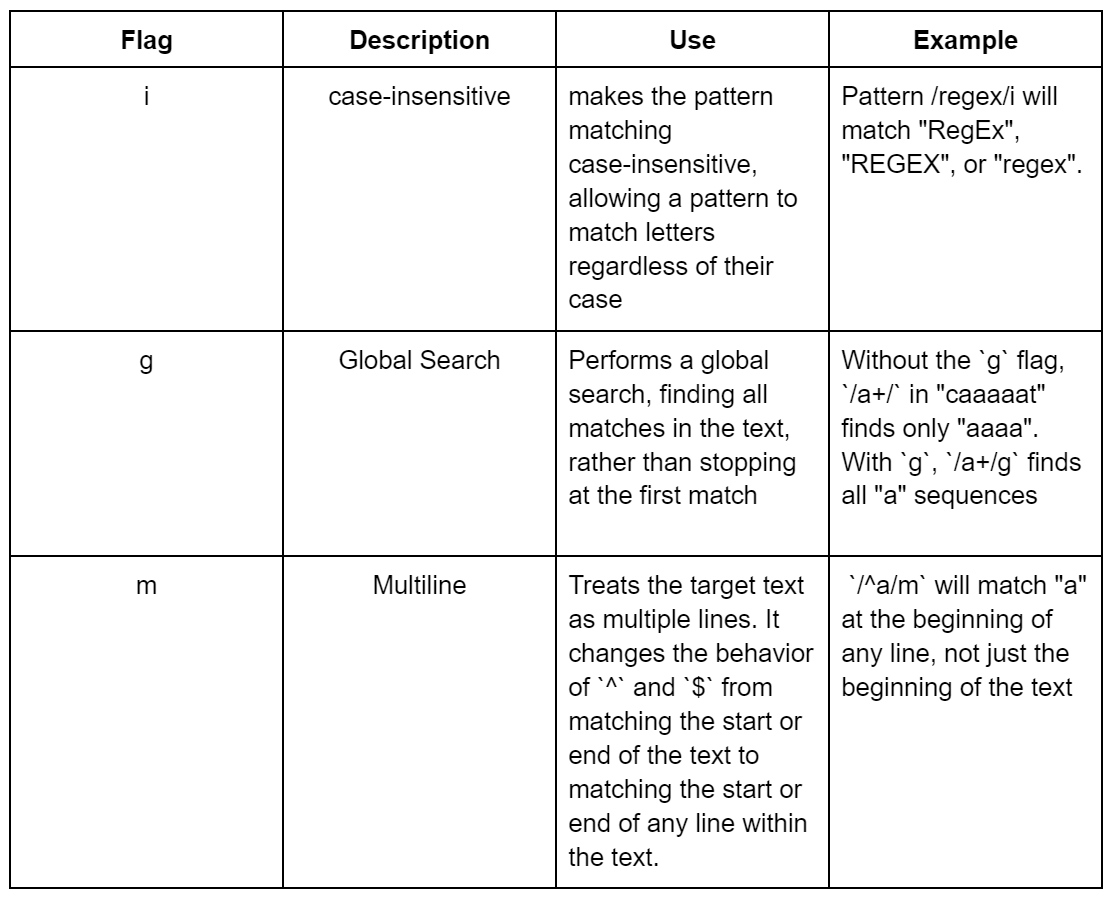
Commonly Used Flags
Best Practices for Using Flags
- Apply Only Necessary Flags: To avoid unintended behavior, use only the flags that are required for your specific matching needs.
- Understand Each Flag's Impact: Be aware of how each flag affects the matching process to ensure your patterns work as intended.
- Document Flags: When using complex patterns or multiple flags, document the purpose of each flag to maintain readability and maintainability.
- Test With and Without Flags: Ensure your pattern behaves as expected under various conditions by testing it with and without the flags.
Using Flags in Practice
Practical Examples
- Multiline Matching: Using the `m` flag can be crucial when working with logs or any text with multiple lines, allowing you to match patterns that span across line boundaries.
- Case-Insensitive Matching: The `i` flag is invaluable for user-generated content where capitalization is unpredictable.
- Global Search: The `g` flag is essential for parsing or extracting all instances of a pattern from a body of text, such as extracting all links from an HTML document.
Applying Flags in Make.com
When using RegEx within Make.com (formerly Integromat), flags can be included directly in the RegEx pattern field of the relevant modules, enhancing your no-code automation workflows by refining your text processing actions.
<insert example here>
Conclusion and Recap
RegEx flags are a critical component of pattern matching, offering the flexibility to tailor the behavior of patterns to suit a wide range of needs. By mastering the use of flags, you can significantly improve the precision, efficiency, and effectiveness of your RegEx operations.
Stay tuned for our next installment, where we will explore the nuances of multiline matching, case-insensitive searches, global searches, and combining multiple flags to achieve specific matching behaviors. Understanding and correctly applying RegEx flags is a crucial step towards leveraging the full potential of Regular Expressions in your projects and workflows.