Integration, Not Replacement: AI Without Switching Systems
 Von Manuel Gick·Certified AI & Automation Expert
Your CRM stays. Your ERP stays. Your accounting stays. Your inbox stays. If someone tells you that AI means replacing your entire system landscape first, they've just sold you a migration project – not an AI project. There's another way. Here's how integration instead of replacement works in practice.
Why "replace everything" fails in SMEs
Rip-and-replace looks convincing on a slide: new system, clean architecture, everything from a single mold. The reality of a small or mid-sized business looks different.
Replacing an existing CRM means migrating ten years of data – and something will get lost, guaranteed. A team that only just learned where every button sits spends months relearning – while day-to-day business keeps running, not pausing. And in the middle of it all, for weeks or months, nothing works properly: the old system half switched off, the new one not yet settled in.
The biggest risk in a system switch is rarely the new software. It's the gap in between. And that gap is exactly why so many digitalization projects in SMEs either never start or get stuck halfway.
The other way: we dock on
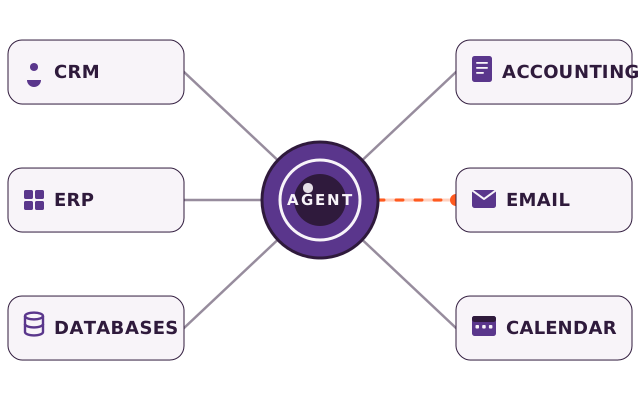
The alternative isn't a compromise – it's often the better solution: instead of replacing systems, we dock AI agents and automations onto what you already have.
Your CRM stays your CRM. Your accounting software stays as it is. Your calendar, your inbox, your inventory system – everything stays in place. What's added is a connection: an interface that lets data flow between systems, or an agent that takes over a task inside an existing system.
Three things don't change as a result – and that's precisely the point:
- No data migration. Nothing gets exported, nothing re-imported. The risk of losing something along the way disappears entirely.
- No retraining. Your team keeps working in the programs it knows. The agent adapts to your workflow – not the other way around.
- No standstill. There's no transition phase where nothing works properly. The new piece joins in while business runs as normal.
What an interface actually means in practice
"Interface" sounds technical, but the concept is simple: it's a connection through which two programs exchange information automatically – without a human retyping anything from A to B.
An everyday example: a customer orders in your online shop. Without an interface, someone types the order into the inventory system by hand, checks stock manually and writes the invoice separately in the accounting software. With an interface, it happens automatically: the shop reports the order, the inventory system books it, accounting creates the invoice – in seconds, without transcription errors.
That's the core of integration instead of replacement: no system replaces another. Two or more systems that used to sit in isolation start talking to each other.
A second example, closer to the office: a customer inquiry arrives by email. Without a connection, someone reads the mail, looks the customer up in the CRM, logs the inquiry manually and then writes a reply. With an interface – or an AI agent built on top of it – the system recognizes the customer automatically, files the inquiry in the CRM and suggests a reply. The human reviews and hits send, instead of doing every step by hand.
Typical worries – and why they're usually unfounded
Three objections we hear regularly before a company takes the first step:
- "Our systems are too old for an interface." Most programs – even older ones – offer some form of data access, and where that's missing, a connection can often still be built through workarounds. A system that's completely sealed off is rare.
- "This will be too complicated for our team." A good integration is invisible to its users. What your team notices is that an annoying task disappears – not that a new interface is running in the background.
- "It'll still take months." Not if the scope is clearly limited from the start. A single, well-defined use case fits into a three-week sprint – a full system switch, by contrast, often drags on for many months.
Four ways we dock on
Different problems call for different tools – we don't commit to one in advance but pick what fits your systems:
AI agents. When a recurring task – email sorting, support inquiries, reports – costs hours, a digital employee takes over exactly that task, directly in your existing system. More on our AI agents page.
Ready-made automation building blocks (Make.com & n8n). When the connection between two systems already exists as a ready-made connector, Make.com or n8n is the fastest, most affordable route: thousands of ready integrations, live in days instead of weeks. We use both wherever they make sense. More on our services page.
Langdock as the team's AI platform. When your whole team needs secure, controlled access to AI – instead of a collection of private ChatGPT accounts – a platform like Langdock is the right lever: GDPR-compliant, ISO 27001-certified, EU hosting.
Custom interfaces and software. When the right connection between two systems simply doesn't exist yet, we build it. Custom software isn't a replacement for your existing systems; it's the missing link between them. More under custom software.
Honest check: when do you NOT need a new system?
Before investing in a system switch, run through this list. You probably don't need a new system if:
- Your current systems work at their core but don't talk to each other.
- The real burden is recurring manual tasks – not a missing program.
- Your team knows the existing tools and works productively with them.
- The main argument for switching is "it's more modern" – not a concrete problem the old system can't solve.
- The cost of switching – migration, training, downtime – would outweigh what it delivers.
If at least one of these applies, the answer is usually: dock on instead of swap out.
When is a system switch actually worth it?
In fairness: sometimes a new system genuinely is the right call. When an existing system is at the end of its technical life, the vendor has dropped support, or the software can no longer meet fundamental requirements – data protection or scaling, say – there's no way around a switch. But that's the exception, not the rule. In the vast majority of cases we see in SMEs, the real problem isn't the system itself. It's the missing connection between systems that have long been in place.
A good test: ask yourself whether the problem would disappear if two systems exchanged data automatically. If yes, you don't need a switch – you need a connection. If the problem would remain because the system itself has fundamentally hit its limits, a switch is the more honest answer – and then we'll tell you exactly that, instead of building an integration that merely papers over the real problem.
What "docking on" means for your budget
A system switch has hidden costs that rarely show up in the first calculation: migration, double license fees during the transition, training days, lost productivity while your team adjusts. With integration instead of replacement, those costs simply don't arise, because there is no transition phase – the existing system keeps running without interruption while the new connection joins in.
That doesn't mean integration costs nothing. An interface or an agent still has to be designed, built and tested. The difference is scope: a single, clearly bounded use case can be delivered at a fixed price, plannable and manageable – a full system switch rarely can.
The first step
Which process should come first for you? The Time Radar shows you in 60 seconds, for free. Whether it's an AI agent, a ready-made automation, a Langdock rollout or a custom interface – which route fits your business is what we settle in the time-potential analysis: 45 minutes, free, no sales pitch. You walk out with an honest assessment of where to start – and with which tool. Book your time-potential analysis.